Sure, this will seriously void the warranty on your TV but that’s what surplus store are for. The mod is pretty straight forward, you are feeding audio signals directly into the deflection inputs on the cathode ray tube of the set. This will cause the electron beam to paint not a regular image but something more along the lines of what you would get from an oscilloscope. I have a 5" Bentley portable TV that is just about to go under the knife for this mod. If all works well I should have some video of the results pretty soon.
Having the Christmas spirit and wanting to build something will make for a productive week. In my office it was announced that there was to be a contest to see what department could make the best Christmas (er, ‘winter holiday’, sorry) wreath. The guide lines were pretty vague on what the content was supposed to be so I chose to make one that properly reflected what the computer department is like. So, armed with a standard issue wreath I set out to wow ’em big time!
First thing I did was wrap the wreath in a string of 70 LEDs. These things are super! the control device has a jaw dropping 16 settings. All sorts of cool cycling and blinking going on there, sure to cause a fit or two.
Next I decided that to was going to have a big bow. All proper wreaths have them right? But mine was going to be unique. No run of the mill floppy plastic felt bow for me, no sir! I was going to make mine high tech. A while back I had bought a Juice Box MP3 and image player. I had a grand idea that I’d use it as a desktop digital picture frame. I didn’t like the way it displayed the images so I chucked it in a box for later. Making a bow that had it’s own slide show would be quite simple with the Juice Box, it’s small enough to cover with other parts and it does the job of image display good enough for this project.
I knew that I’d have to cover up the interface between box and screen so after walking around a craft shop for a while I struck upon the idea of building a micro wreath to cover things up. Using three different kinds of fake cranberries, I un-wrapped all of them and then twisted them on to a wire frame.
After the frame was built I started work on the bow. The bows that I could find that looked good are made up of discreet stapled ‘bow-ets’. I don’t know what the correct name is, maybe it’s a ‘sub bow assembly’. Whatever. I took each of the small bows and added two staples on either side of the center staple. I removed the original staple and cut the bows in half. I used a scrap piece of black matt-board to cut a frame around the Juice Box screen, to this I started hot gluing the bow halves to.
Once the bow was pretty much back in its original shape I covered the edges and the gobs of hot glue with some bow scraps. After that I wired the mini wreath to this and shaped the wire to obscure the edges of the bow.
To secure the Juice Box bow to the wreath I zip tied a stick of bass wood at the bottom front of the wreath. On the back of the Juice Box I glued a similar stick on the top so I could wire them together. I needed to be able to swing the bow up in case I needed to make a battery change. I know, I could use a 4.5 volt AC adapter but I couldn’t find one and I was feeling clever.
Using more hot glue I attached short bits of florists wire to all the parts that are going the be infused in the wreath. The numbers are just ones and zeros that were cut into strips from a single 11×17 print out. The hard drives (not pictured) are form some old laptops that were hiding under a desk. Their 360 MB capacity platters will look nice and pretty once the lights start reflecting off them. The CPUs are AMD K6/450s that were removed from computers that were to be sent to surplus.
I needed a nice ‘Happy Holidays’ sign in it someplace so naturally I chose the keys off from the scrap laptops. Those 386’s never saw it coming! To make sure the keys were all lined up on the wire frame I taped them to a metal ruler. Never under estimate the power of magic tape! Handy stuff.
I secured a length of flipped over tape to the ruler and set out the keys. I started at the center of the keys and tacked the ends of the wires. Once all the keys were glued to the wire I then ran small bits of wires to hold the lower line of text in place. A smart curve later and I was ready to wire it in place.
The placement of all the parts didn’t follow any structured organization. I knew that the big things, the hard drives, needed to go on first. I worked on making a loose balance in the composition. No big clumps of stuff in any one place.
Once everything was together I added a bunch of photos to the Juice Box using Christopher JBP image converter and I was all set.
I’m happy with how it turned out. It may not win the first prize (it’s lacking in kids and animals) but it’s bound to cause a stir. I like the iWreath, too bad it doesn’t play music.
Otona No Kagaku, or ‘Science for Adults’ is a ‘mook‘ (‘M’agazine + b’OOK’) series published by Gakken in Japan. Each issue has includes a kit that goes along with whatever the issues topic is. This one deals with heat engines and comes with a low temperature Stirling engine. The entire project took me about an hour to put together and it quite satisfying once you see it chugging away over a cup of hot water. This kit was bought from Karakuricorner, they have loads of the mooks there. If you know of anyone that likes science and can use a screw driver I would seriously think of buying one of these at a gift. And it’s not like the projects are lame either, you can make a pinhole camera, radio receivers from crystal to vacuum tube, microscopes, telescopes, and even a planetarium. I can only hope that one day I’ll be able to go into a book store of hobby shop here in the US and find kits of this quality and diversity. There may be some hope in this as I did notice that the pages of the mook are numbered from left to right. This would make translating the layout into English a lot simpler.
Don’t throw away those used metro cards and business cards! Make your very own fleet of paper airplanes from them. Heck, even post cards are fair game for your air force. Oh yeah, you don’t need to stick to fixed wing aircraft, you can build a helicopter if you have the guts (this one will be hitting the ‘blogs soon I’m sure). Some designs are even powered by rubber bands! Simply amazing.
Yeah, so why should you buy high tech toys when you can build your own? This is a very sweet project I hope to see other people try this as well.
"This is hybrid screen/graphics tablet which makes me drool. The price however makes me weep, £2000ish for the 20" version. They also do a thing called the PL at 17" for a more reasonable £500ish. Occasionally they appear on the site in their bargain basement ex-demo section. Still hard for me to justify though.
Then I had one of those "spang" moments. None of the tech involved is new and all is readily available second hand, it’s just a matter of putting it together. My Wacom at work will happily operate with the stylus off the surface, after that it’s just an LCD screen, right? Anyhow where’s the fun in just buying something?
Experiment – what depth does a tablet work to? Stack of paper says 9mm before accuracy starts to suffer noticeably. An LCD with an EL film backlight has to be thinner than that.
So here’s the challenge, What is the least amount of money I can build a Cintiq style device for?
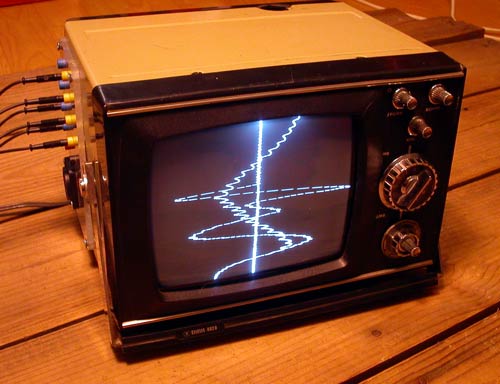 Sure, this will seriously void the warranty on your TV but that’s what surplus store are for. The mod is pretty straight forward, you are feeding audio signals directly into the deflection inputs on the cathode ray tube of the set. This will cause the electron beam to paint not a regular image but something more along the lines of what you would get from an oscilloscope. I have a 5" Bentley portable TV that is just about to go under the knife for this mod. If all works well I should have some video of the results pretty soon.


 Don’t throw away those used metro cards and business cards! Make your very own fleet of paper airplanes from them. Heck, even post cards are fair game for your air force. Oh yeah, you don’t need to stick to fixed wing aircraft, you can build a
  Celebrate the holidays with your own movable paper Santa!