 This is proving to be Holga week here at the lab. Joe Harris left me a comment on my Holga fish eye lens find telling me that he maintains an FAQ on the creative camera. I had a read and I’ll agree, it’s just the thing some one would need when either deciding on what version to buy or how to do things that may not be covered in the book. I like the part on how to tell the different models apart and "How do I get those famous “dreamy” Holga colors?" What more can you ask for in a FAQ?
Author: John
Photo Upload to Flickr Plugin for Picasa

At long last! A tool to post photos directly from my favorite image manager Picasa to Flickr where I have all of my photos on display. It’s quite easy to use and if you’re a user of both then you should give this a try.
[via cybernet, lifehacker]
picasa2flickr – flickr upload plugin for picasa
Fish Eye Lens for Holga 120 Cameras
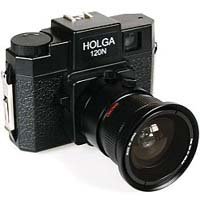 Now this is an odd bird. I never thought I’d see an auxiliary lens kit for a Holga camera. If you didn’t know, the Holga 120 format camera is an amazingly cheap medium format camera in both price and quality. The only reason that the cameras aren’t serving as filler in a sea wall somewhere is that it takes a darn unique photo. For some examples check out the Holga Fisheye pool on Flickr. Something about the cheap plastic lens. Not too shabby if you’re on a budget and want to shoot medium format film. The lens will give you a 60degree FoV and a focal length of 25.2mm and even comes with two mounting rings. A very alluring offering if you ask me.
TeamDroid Camera Shop – Holga Auxiliary Fish Eye Lens for Holga 120 Cameras
LEGO Key Rack
 LEGO has a clever little accessory for keeping track of your keys. I’m kind of surprised that no one had done this before. Maybe it’s because the ABS plastic doesn’t seem strong enough to weather a pocket full of keys. Maybe the key fob brick has some filler that adds some strength to the brick.
Beauty and Magnets – The Art of David Durlach
A number of years ago I video taped an amazing demonstration of iron filing manipulation choreographed to pop music at a local science museum. I was fascinated by the undulating tree like figures and the dry liquid waves that played across the surface of the tank. I posted the clips I had of the display on to YouTube so others could share in my wonderment. Turns out that this is not a one off display but the work of an artist named David Durlach. One of the comments on the clip pointed to an article on this amazing artist. I had thought the devices were an analog spectrum display but the happens that they are under elaborate computer control. This is an excerpt from the article on Discovermagazine:
This five-minute display is the result of hundreds of hours of programming, not to mention the computer language Durlach had to create to specify the details of choreography. In this language, Durlach not only shifts dust through the three spatial dimensions, he also plays with time, changing the rate at which it appears to flow, moving it forward and backward, to achieve especially fluid motion. One of the interesting things is that you can make time go forward and backward like a sine wave, he says. It’s as if you took the reels of a movie, and instead of rotating them continuously forward you moved them back and forth, woonk-woonk, woonk-woonk. That’s a very cool effect. Durlach goes on to enumerate the different ways you can play with time, and the effects they generate.
Beauty and Magnets
(Thank you Bill Beaty for this lead)
Gravity Transport System
 This is a fascinating look at just what would happen if you, theoreticly mind you, drilled a hole right through the Earth and jumped in. Can you say see you on the other side of the planet in about an hour? Oh yeah, there’s the issue of actually drilling the hold, evacuating the massive amount of air that would be in the tunnel and all those other niggly technical bits but just thinking of the concept is flat out fun.