Augmented Reality: Neon Racer

Neon Racer 

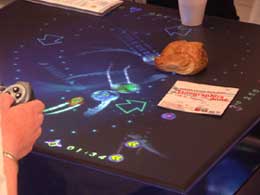
Yes, if you set your coffee mug down on the display you can halt the forward progress of your opponent. For added hazards small animals could also be used. I’m thinking that a small sleeping cat could be the perfect obstacle in this game. How long will the cat sleep? Will you be flying by it when it awakes and causes you to crash?

Neon Racer is a multi-user Augmented Reality (AR) racing game adapting the simple and powerful gameplay of racing games to an AR tabletop setting. The game combines an intuitive and tangible interface with quality content. In this demo we explore how a rich gaming experience can be created by using only a limited amount of virtual information. The game compacts the use of virtual elements to a minimum, displaying only the players’ racing vehicles and lap checkpoints. The active setting for the game is provided by the physical world, and all its parts can influence gameplay. Physical objects act as collision obstacles and influence the course of the race itself. Participants have to interact with both the virtual and real objects to succeed.

[via we-make-money-not-art]
Neon Racers 

Win, Lose or Draw


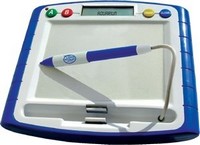
 This is an electronic version of the (now) classic game ‘Win, Lose, or Draw". The question shows up on the little LCD screen located on the pad and then you try to draw it on the graphics tablet. You and your teammates get to see the thing your trying to draw up on the TV. Without the benefit of having played with one of these, but playing the analog game a few times I can see some interactive things are going to be lost when you play the game this way. Like how you can fake out the other team by throwing them off the track with pen motions for starts. Plus, your going to want to have an LCD projector to play this unless your all huddled around the boob tube.

Win, Lose or Draw

OK, Genius, fix this one!


This sounds like something I would do, in fact I once went in to an Apple store and asked if there was any hope for my beige G3. The first ‘Genius’ looked at me blankly and called a coworker over to see if he knew what the heck I was talking about. What do you know, turns out my G3 doesnt have an upgrade path at all and should be retired ASAP. Good thing I didn’t tell them about the G4 CPU card that I had installed and the fact the web page that I was browsing at the Apple store was being served up by it. OS X might not run fast on it but it does run.
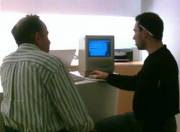
Anyway, this is an amusing photo of a guy that brought in his old SE asking the counter help at the Genius bar of his local Apple store about if he could upgrade it. I’m with the Engadget guy, I bet they said he could add a bit of memory and that’s about it.

OK, Genius, fix this one!

Birds (feathered kind) Crash ATC Radar

radar 

Now this sends a chill up my spine…  Apparently a large flock of migrating birds were the cause of a systems crash at the St. Louis air traffic controller system. Everything turned out to be fine, the Kansas City airport was able to take over while the computers were being rebooted. The FAA is looking into the event.

Birds (feathered kind) Crash ATC Radar

StereoPhoto Maker

Stereo Photo Maker 

Many years ago I was hanging out with some friends of mine when one of them produced some colored pencils and a pair of red/green anaglyph glasses. We then spent a fun filled evening trying to draw things in 3D. Had pretty good results. Anyway, I was bitten by the stereo image bug. Soon after that I bought a 1954 Kodak Stereo camera and stocks to make my own slides. Hundreds and hundreds of images later I now want to scan them into the computer and do more with them. For quite a while I was using Photoshop to align the images and tweak them until they looked good but that was taking hours. Then I happened on a bit of freeware called StereoPhoto Maker. It was exactly what I had been looking for. It allows me to make parallel pairs, cross eye pairs, color anaglyphs and other formats that I never thought I’d ever be able to make. The alignment system is simple to use yet powerful enough to fix just about any image you throw at it. I shoot a lot of stereo pairs using the ‘hip switch’ method (stand with your weight on one foot and take the shot, then while still looking through the viewfinder at the subject tranfer your weight to your other foot and take the second shot) because it saves on the cost of getting film processed. In doing this sometimes the images are not exactly on the right axis and need to me tweaked a bit. StereoPhoto Maker steps right up and hits a home run. I have a set of photos on both my TeamDroid gallery and my Flicker gallery that have been made using this program. You can even add a lower third credit to your images if you want. It’s an amazingly handy program, if your shooting 3D images you should take a look at it.

StereoPhoto Maker