How To Convert Christmas Lights to Run on Batteries

Battery Christmas Lights: How to convert Xmas lights to run on batteries/DC 

Just as Christmas rounds the corner the notion of LED Christmas lights shows up on the shelves of popular stores. Those things are juts too inviting not to hack up, eh? I mean you get like 70 LEDS or various colors in pre-wired sockets. How cool is that? The obvious hack is to ween them off from AC power and let them suck on batteries. The hack listed below is pretty much for the always on non-flashing LED or old fashioned incandescent bulb strings but I’m betting that the ones with the cycle controllers can also be hacked. I’ll be doing this in a few days, I’ll let you know how it works out. Try the hack out and have fun bending them to you will. Muhahaha!

Battery Christmas Lights: How to convert Xmas lights to run on batteries/DC (regular or LED)

Skyacht

SkyachtWhen I was a youngster I remember a children’s book called something like the great balloon race. I don’t remember the exact plot of the story (it should be self evident from it’s title) but the flying contraptions were just fascinating to me. All sorts of balloons with weird cars under them. Very inspirational to a seven year old. So, with this hot air balloon I could recapture the dreams of my youth! Or I could putter around a park at 12 MPH. Still, this would be darn fun. Plus, it looks like a prop from the movie, ‘The Great Race‘. How cool is that?

[via ektopia]

SKYACHT

Blu-Ray Laser Pointer

Blu-Ray pointerI got an email from the boys over at Hacked Gadgets this morning about some horrendous things being done over at Wicked lasers. The laser guys have decided to do a little modding of a brand spanking new Blu-Ray equipped DVD player. They ripped out the laser diode assembly and placed it in an easy to abuse aluminum housing, just the right size to take to parties, shopping, and trade shows, etc. The purple beam (405nM at 23 mW) is bound to make lasting impressions with whomever you blind, er, I mean show it to…

Hacked Gadgets – Making the Sonar Blu-ray wicked laser

Laser safety 

Remote Head-Mount Gyroscope-Controlled Camera Plane


Ooo, an R/C plane with a cockpit mounted micro video camera/transmitter that’s slaved to a gyro on the pilots head. Lots of discussion here. Video here, here, and here (best by far, lots of close passes with the ground).

Pretty much the idea is that the camera is sending a cockpit point of view back to the pilot where he views it on a set of head mounted goggles. To add a bit of extra zing to the equation the camera pans and tilts in response to the wearers head movements. You can see the fun that could be had with this, eh? Telepresence is amazing!

Some specs and build notes from the discussion group: (prices in Canadian I think)

My equipment is old. New equipment:
Gyro:$425
headset:$699
cam: $99
video tx/rx: around $150
antenna: 8dbi patch (optional) around $60
amateur radio license is req’d because you need to exceed 10mw of power.(it’s not hard to get and inexpensive in Canada)
and also it’s easy to plug, but not easy to get good video link without video dropout. It’s not easy to explain everything for me to someone who don’t have good electronic skill, for now it’s not for everyone.
The cam in this setup is glue on a servo and allow 45 deg of panning, the servo is plug in the rudder channel if not use or on slider etc. The servo can be modified to 180 deg easily by adding two resistor on pot. lead or buying a special circuit.

Remote Head-Mount Gyroscope-Controlled Camera Plane

Optimus Upravlator Keyboard

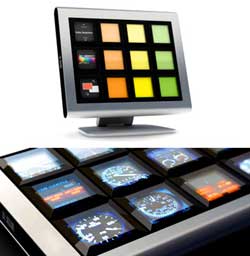
Humm, not quite the keyboard that was shown around the Internet like a gold plated dancing monkey a few months ago but it’s close.

The Upravlator keyboard is an input device of a new type. Within the case, a 10.8″ LCD screen with a resolution of 800×600 pixels is enclosed. Over the screen, there is a board with 12 transparent buttons. Every button features four contacts (at the top, at the bottom, on the left, and on the right). Pressing the button in the middle is possible, too (“fifth contact”)
Besides the power supply cord, Upravlator uses another two cords for connection to a computer (USB and VGA). To plug the video cable, the second monitor port (available in most configurations) or the second video card are used (the choice of the video card is up to you, it’s not part of the standard package).
Upravlator uses open standards and protocols, which will make it easier for developers to create applications. The to work under Windows and Mac OS X.
device is going
Expected to be available for sale in the second half of 2007.
Patents pending.

Ok, I’ll help out with their viral marketing, it’s cool enough for that. These things would be killer for voice over IP phone systems. Many times they use either an LCD sidecar (box on the side of the phone that costs an obscene amount of cash) or an application that runs on your PC (PC needs to be on all the time, the license costs an obscene amount of cash and extra software on computers is just bad.). This would replace the sidecar and be driven from the phone or the PC. Extra keyboard and screen all in one. Well I think it’s a cool idea. Yeah…

 [via thegadgetblog]

Optimus Upravlator keyboard